Apptainer: Getting started
Overview
Teaching: 30 min
Exercises: 20 minQuestions
What is Apptainer and why might I want to use it?
What issues motivated the creation of Apptainer?
What are the differences between Docker, Apptainer, and Singularity?
Objectives
Understand what Apptainer is and when you might want to use it.
Learn the design goals behind Apptainer.
What is it?
Apptainer is a container platform that allows software engineers and researchers to easily share their work with others by packaging and deploying their software applications in a portable and reproducible manner.
When you download an Apptainer container image, you essentially receive a virtual computer disk that contains all of the necessary software, libraries and configuration to run one or more applications or undertake a particular task, e.g. to support a specific research project.
This saves you the time and effort of installing and configuring software on your own system or setting up a new computer from scratch, as you can simply run an Apptainer container from the image and have a virtual environment that is identical to the one used by the person who created the image.
To visualize what containers are offering, let’s consider one division of the different layers of what a software package’A’ needs in order to run. You need to provide some hardware in the form of a computer with a CPU, RAM, disk space, and other similar resources. Then, you need to install an operating system (OS) on this hardware, such as CentOS. With the operating system installed, you can install the binaries and libraries that your software ‘A’ depends on. Finally, you can installand use software ‘A’ itself.
This workflow is OK for personal workstations, or other single-user machines. It has worked for decades, after all. But you can run into a few different issues that make it less than ideal for some workflows:
- Installing and configuring the dependencies of a package can be complicated and time-consuming
- What if you want to run the same software package at different computing centers? Now you have to duplicate the setup/installation work from scratch
- Not all software is available for every OS, so you might need multiple workstations or to multiboot in order to install all of the software you want
- In a shared user environment like MSI, you have more limited control over dependencies and no control over the OS or hardware
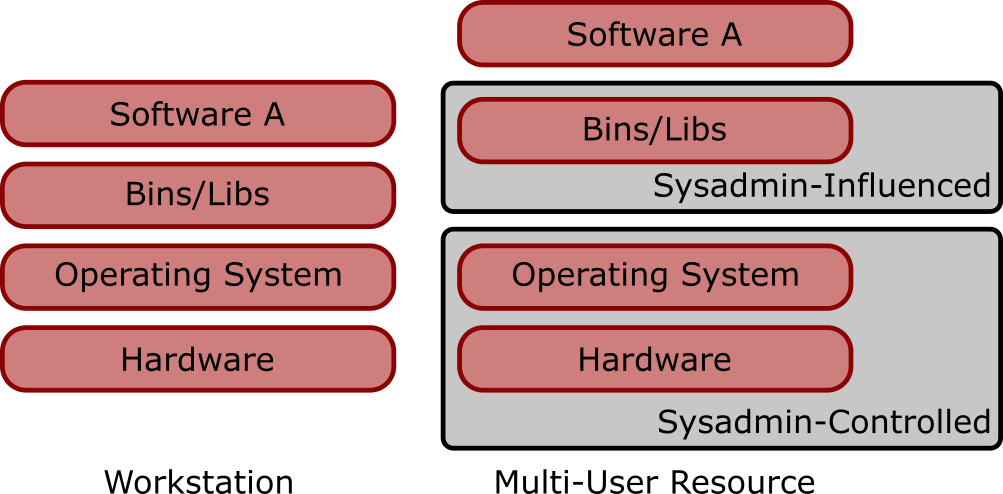
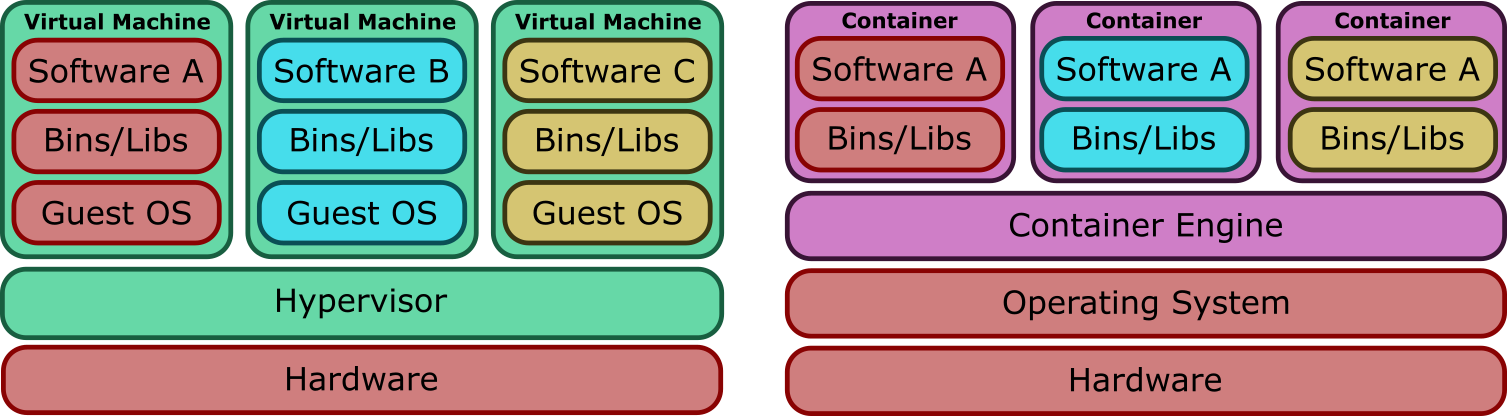
There are a couple of common ways to deal with these issues - virtual machines (VMs) and containers. Conceptually these two solutions are similar - isolate the environment you want to manage away from the host system, so you can run multiple independent environments. They differ a bit in implementation, however. While a VM-based solution requires each environment to run its own independent operating system, a container-based solution provides a translation layer between the environment and the host operating system. The specifics of this go a bit beyond the intended scope of today’s material, but this has two important high-level consequences that make containers the more appealing solution for MSI:
- The relationship between the VM guest OS and hypervisor creates security and privacy concerns in a shared environment
- Using a container is less complex than using a VM because you don’t have to provide and configure an entire OS
Images and containers
A brief note on the terminology used in this section of the course. We refer to both images and containers. What is the distinction between these two terms?
Images are bundles of files including an operating system, software and potentially data and other application-related files. They may sometimes be referred to as a disk image or container image and they may be stored in different ways, perhaps as a single file, or as a group of files. Either way, we refer to this file, or collection of files, as an image.
A container is a virtual environment that is based on an image. That is, the files, applications, tools, etc that are available within a running container are determined by the image that the container is started from. It may be possible to start multiple container instances from an image. You could, perhaps, consider an image to be a form of template from which running container instances can be started.
Many solutions are available for working with containers. One of the more common ones you may have heard about is Docker, which was developed for enterprise infrastructure workloads. You might have even used Docker to run some containers on a personal workstation, as it can be a good fit for that type of workflow as well. It isn’t a good fit for running HPC workflows, however, due to some security and feature restrictions imposed by its design.
Apptainer is an alternative container platform created specifically for the HPC use case. It allows users to build and run containers with just a few steps in most of the cases, and its design presents key concepts for the scientific community:
- Single-file based container images, facilitating distribution, archiving and sharing.
- Security model compatible with multi-user shared resources (no root permissions needed to run it, permissions preserved inside the container)
- Simple integration with resource managers and distributed computing frameworks because it runs as a regular application.
Apptainer vs Singularity
In these lessons you see the name Apptainer or Apptainer/Singularity, and the command apptainer.
As stated in the move and renaming announcement, “Singularity IS Apptainer”.
Currently there are three products derived from the original Singularity project from 2015:
- Singularity: commercial software by Sylabs.
- SingularityCE: open source Singularity supported by Sylabs.
- Apptainer: open source Singularity, recently renamed and hosted by the Linux Foundation. As of Fall 2022 all three Apptainer/Singularity versions are compatible and practically the same, but have different roadmaps. There is hope that in the future they will join forces, but this is not currently the case. To understand how this came to be you can read the Singularity history on Wikipedia.
MSI provides Apptainer, the most adopted variation in the scientific community, so we are using the apptainer command.
If you are using Singularity or SingularityCE, just replace the command apptainer with singularity and the
APPTAINER_ and APPTAINERENV_ variable prefixes with SINGULARITY_ and SINGULARITYENV_.
But since its previous version was named Singularity and the developers wanted backwards-compatibility, if you have older scripts still using the singularity command they will work also in Apptainer because it is providing the singularity alias
and full compatibility with the previous Singularity environment.
Documentation
The official Apptainer documentation is available online. Contains basic and advanced usage of Apptainer beyond the scope of this training document. Take a look and read the nice introduction, explaining the motivation behind the creation of Apptainer.
Key Points
Apptainer is a container platform designed by and for scientists.
Apptainer has a different security model to other container platforms, one of the key reasons that it is well suited to HPC and cluster environments. User inside the container = user outside.
Apptainer/Singularity has its own container image format (SIF).